Stack Merge
Stack Merge
Download on Google Play or Apple App Store! Links are below this guide.
(Web version has issues with touch controls, use the app instead if you are on mobile!)
Join the Discord!
Goal
- Survive as long as possible without running out of space.
- Make more space by merging blocks of the same value!
How to Play
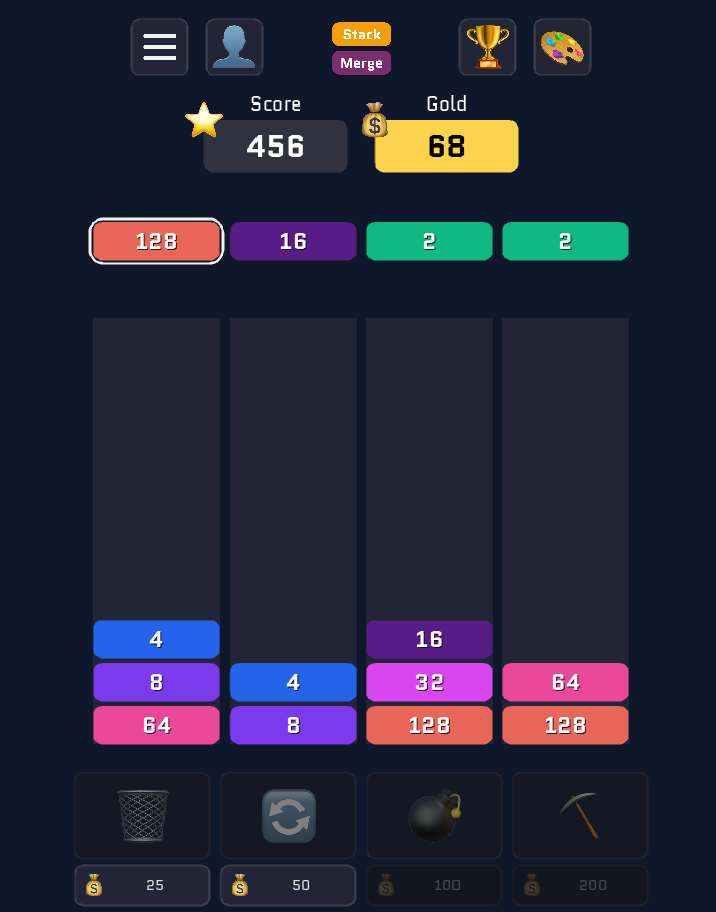
- A small queue of upcoming blocks is shown above the playfield.
- Tap one of the four columns to drop the next block into that column.
- When two matching blocks end up stacked together in a column, they merge into a higher-value block.
- Dropping blocks earns score, while Merges earn gold.
- Survive as long as possible without running out of space to get a high score! When you run out of space and can no longer place a block, the game is ended.
- Use gold to buy items when you need help.
Score + Gold
- ⭐ Score increases as you place blocks.
- 💰 Gold is earned from merges and is used to buy items.
- Chain reactions earn bonus gold! The longer the chain, the more gold you'll earn.
- Holding onto large blocks earns you a gold multiplier. This is the key to affording items as they increase in price.
- Merge blocks to create a 1024 block.
- Holding onto this block gives you 10x gold multiplier! Any additional 1024 blocks add to this, so two separate 1024 blocks would earn 20x gold.
- 2048 blocks earn 100x gold!
- It's important to keep building bigger blocks in order to earn enough gold to survive.
Items
Items are bought with gold. You can buy multiple items, and use them whenever you wish.
You can always cancel the item by tapping it again instead of using it.
Trash
- What it does: Remove a block from the queue.
- How to use:
- Tap the Trash button to activate Trash mode.
- Tap a block in the queue to delete it.
- Tap the trash button again to cancel and return to normal play.
Swap
- What it does: Lets you choose a different queued block as the next drop.
- How to use:
- Tap the Swap panel to cycle the selected next block in the queue.
- Drop the highlighted/selected block into a column.
Bomb
- What it does: The next block becomes a bomb (or can be defused if it was already a bomb).
- How to use:
- Tap the Bomb panel to toggle Bomb mode for the next queued block.
- Bomb behavior:
- Bombs are special blocks. Bombs explode the entire stack when they are merged. A bomb block can merge with a regular block and it will still explode.
Pickaxe
- What it does: Destroy a block in a column (to free space or break a bad stack).
- How to use:
- Tap the Pickaxe panel to activate Pickaxe mode.
- Tap a block in any column to remove it.
Game over
You lose when you run out of space and can no longer place a block.
Also available on


Leave a comment
Log in with itch.io to leave a comment.